Prompter Tips for Presenters and On Camera Talent
Welcome to our presenter page…
Why Use a Video Prompter?
How to Use a Video Prompter
Why Use a Prompter for a Live Event?
How to Give a Speech with a Prompter
FAQs
Welcome to our presenter page…
…where you’ll find prompter tips and ideas to improve your performance for both novice and experienced users. (See our “How to” sections.) If you’re considering a prompter for the first-time, we’ll discuss what it can do for you. (See our “Why” sections.) A teleprompter lets you read a script without looking like you’re reading. You look like you’re talking directly to the audience—and you have your words down cold! And another benefit: you don’t have to worry about what you’re saying, and can put your effort into how you say it, into using your tone of voice and your pace and your emphasis to deliver a more interesting performance. Once you’ve worked with a teleprompter, you’ll never look back. |
![]() |
Why Use a Video Prompter?
An executive is rehearsing with an on-camera prompter for his video debut. After the first read-through, he asks, “Where’s the camera?” The director smiles and explains, “You’ve been looking at it. It’s right behind the teleprompter mirror.” That’s how a prompter lets you read a script and look into the camera at the same time. You know what to say, so you can focus on the way you say it. The ability to engage a live audience doesn’t necessarily translate into a strong presence on camera. When you see your listeners, you can respond to their subtle reactions. You don’t get the same sort of feedback from the glassy eye of a video camera. Most people struggle to ad-lib on camera. If they accomplish a good “take” (usually after several attempts), they don’t remember what they said, so they can’t repeat it when the director asks for a retake. (And why do directors ask for a second good take? In the trade it’s called a ‘safety’—just in case there’s physical defect on the tape, or a verbal bobble nobody caught.) A prompter’s very affordable, especially when you compare it to the cost of the entire video. And it can help your personal ROI, too: you’ll record more good takes while expending less time and energy. Request a prompter for your next video project and make your on-camera appearance easier. |
![]() |
How to Use a Video Prompter
It’s easy to use a prompter: you just show up and read your script until you’ve got a good take. And here are a few tips for improving your on-camera performance. Practice. Read the script aloud a few times before the shoot, so you get comfortable with it. You want to sound conversational. Revise. Revise words that are difficult to say, or don’t match your speaking style. For example, you might replace “utilize” with “use.” We always suggest contracting the formal “I am” or “you are,” to “I’m” or “you’re”. Focus on your delivery. It’s distracting to the viewer when you sound formal or stumble over words. So relax, smile and read from the screen as though you’re talking to a friend. (You know, pretend!) Ask for Dallas Prompter. Our skilled teleprompter operators and high-end software can make your on-camera experience much easier. We go the extra mile with tools and time-tested techniques that can make the difference. |
|
Why Use a Prompter for a Live Event?
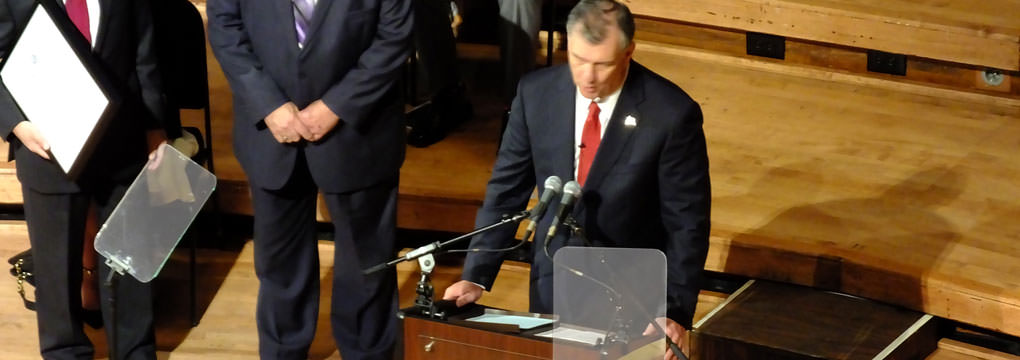
Like a Swiss Army knife, the teleprompter offers a variety of benefits wrapped up in a single tool. It’s a valuable asset not just for presenters but for meeting planners and content managers, too. Meeting Planners. Scripted presenters finish on-time (usually), so your session is more likely to stick to the schedule you worked so hard to establish. Use rehearsals to time a presenters’ speeches, and keep them aware of what follows them on the agenda (ie, what’s going to get screwed up if they run over). Content Managers. Teleprompter rehearsals help you preview the arc of a meeting across several speakers, and to uncover overlapping information in separate presentations. These rehearsals also provide a valuable milestone for monitoring everyone’s progress before the event. Presenters. It’s a memory device and a safety net; it keeps you on-track and on-time; and because you don’t have to think about what you’re going to say next, it lets you focus on how you present. * It keeps your head up. You can read from a script without looking down at paper. You’ll look better on stage, on the big screen, and in the video recording of your performance. * It keeps you accurate. Sensitive topics need to be discussed in appropriate terms; mis-speak, and you may distract your audience from the rest of your message. * It keeps you on track. You have a limited time to convey your message. Write, rehearse, and deliver your speech to fit that time—and keep the meeting planner happy. * It keeps you in synch. PowerPoint and videos are cued to your script. You don’t have to advance a graphic or ask for a video roll, because your production crew can follow your script, and give you what you want, when you want it, without your asking. * It keeps you up front. There’s no typescript or index cards to grab the audience’s attention. They can’t see the script, they’re never aware you’re reading from it; they’ll never notice even a Presidential Glass, unless you draw attention to it. |
![]() |
How to Give a Speech with a Prompter
Like any tool, you have to learn how to use it. And even if you’re comfortable with a prompter, it’s always a good idea to rehearse before an event. Craft your message. Work with your writer and trusted advisors to develop a speech that matches your voice and style. Rehearse with the prompter.
Avoid ad-libbing. The contrast with your prepared text may come off as careless speaking; and you risk diluting your message by hesitations and repetitions. If you intend to say it, write it, and add it to your prompter copy. Introduce yourself to your prompter operator. We’re part of your presentation team, and we’d like to meet you. |
![]() |
Frequently Asked Questions
How do I control the scrolling words? Can I trust the prompter operator to stay with me?
If the operator doesn’t seem competent with the software, or doesn’t match your pace, ask (respectfully but firmly) for a better operator. Do I need my glasses to see the prompter? This is my first time to give a speech with a teleprompter. What do I need to know?
I want to walk around the stage. Can I still use the prompter? Can I ad-lib? Will the audience know I’m using a prompter? Can I speak to my PowerPoint slides? How much rehearsal do I need with the prompter? |
![]() |